Multiple disconnected tools
A different vendor for desktop, web, mobile, API, database and load — each with its own language, its own reports and its own maintenance burden.
From a browser click to a robot’s touch. Cinnamon360 replaces five to six siloed testing tools with one intelligent platform that covers your software and the physical hardware it runs on.
No credit card requiredPlans from $49/monthRuns inside your network
One connected test ecosystem
Trusted by teams at
40–60%
Reduction in tool sprawl and licensing spend
7
Categories of tooling consolidated into one platform
6+
Test surfaces covered, from desktop to robotics
15 days
Free trial, no tooling migration required to start
The automation challenge
Modern software and hardware rely on deeply integrated architectures — but the tools used to test them were never designed to talk to each other.
A different vendor for desktop, web, mobile, API, database and load — each with its own language, its own reports and its own maintenance burden.
Five or six subscriptions, five or six renewal cycles, and specialist skills required for each one before a single test runs.
Script-first automation breaks on every UI change, so regression becomes the bottleneck instead of the safety net.
The POS terminal, the printer and the scanner are tested by hand, so the riskiest part of the journey is the least covered.
The result? Delayed rollouts, critical production issues and exorbitant regression costs.
The Cinnamon360 platform
Seven test surfaces, one test library. Build a workflow that starts at an API call, moves through the UI, checks the database and finishes at a printed receipt.
Automate thick-client, Windows and legacy UI applications with visual element recognition — no accessibility tree, no source access, no brittle object maps required.
A recipe for reusable tests
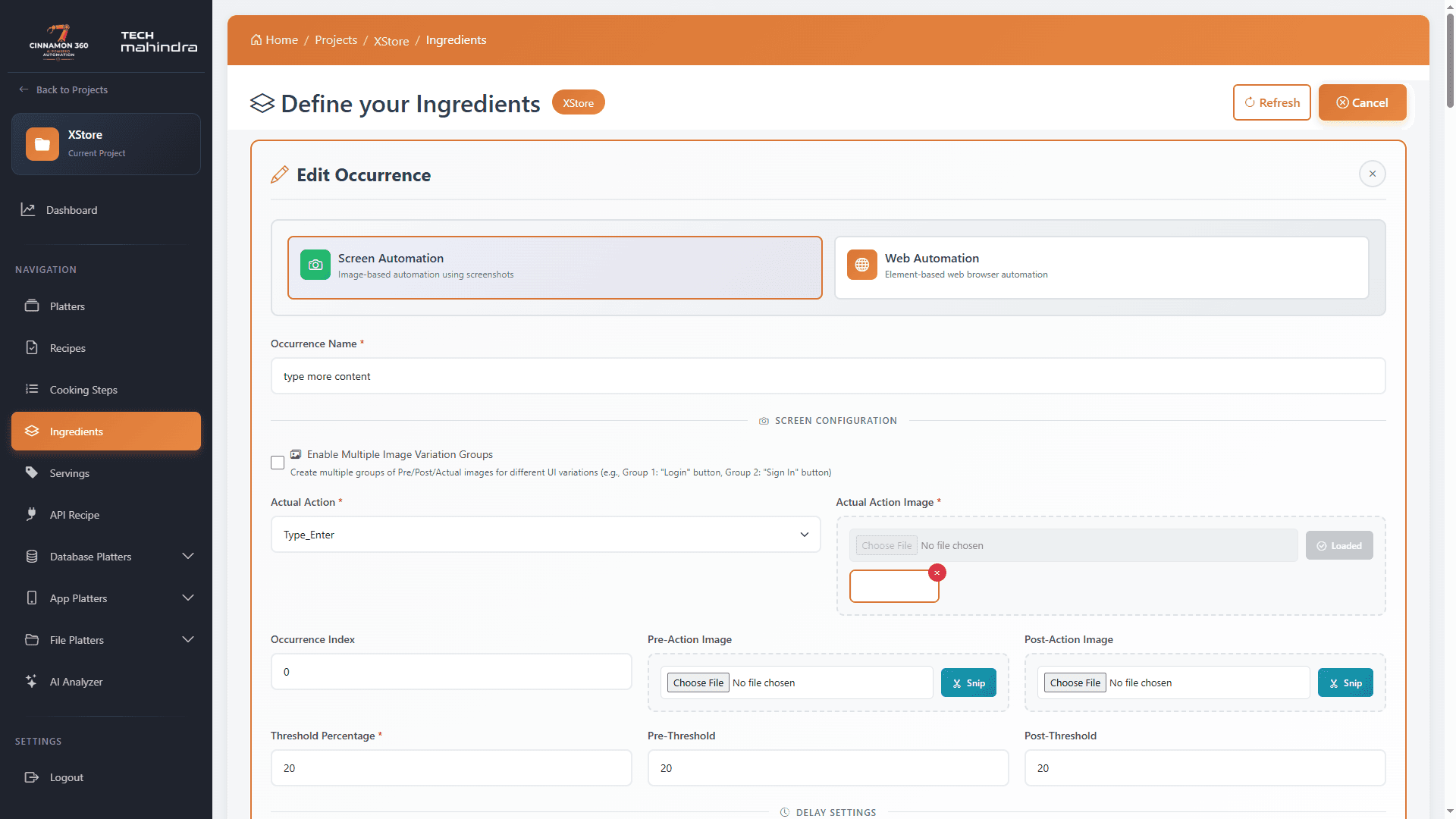
Organise massive test suites logically — from a top-level release down to a single atomic click.
Test scenarios
Top-level containers. Group related scenarios into logical suites representing a release, a project phase or a business area.
Test cases
Complete workflows defining a business scenario. Each recipe is composed of test steps that combine to validate a real user journey.
Reusable actions
The atomic building blocks — clicks, data entry, UI validations and assertions — that string together to compose every recipe.
Tool consolidation
Every category below is native to Cinnamon360 — same test library, same execution engine, same report. That consolidation is where the 40–60% reduction in tool sprawl and licensing comes from.
Seamless CI/CD integration, a 40–60% cost reduction and faster release cycles across a single unified control plane — with one vendor, one skill set and one place where every result lands.
Intelligence in the workflow
AI assistance brings your test context, execution results and media evidence into the same conversation — using OpenAI, Gemini or Copilot.
Beta capabilities are shared with trial customers as they land. Ask us where each one stands today.
Beyond the screen
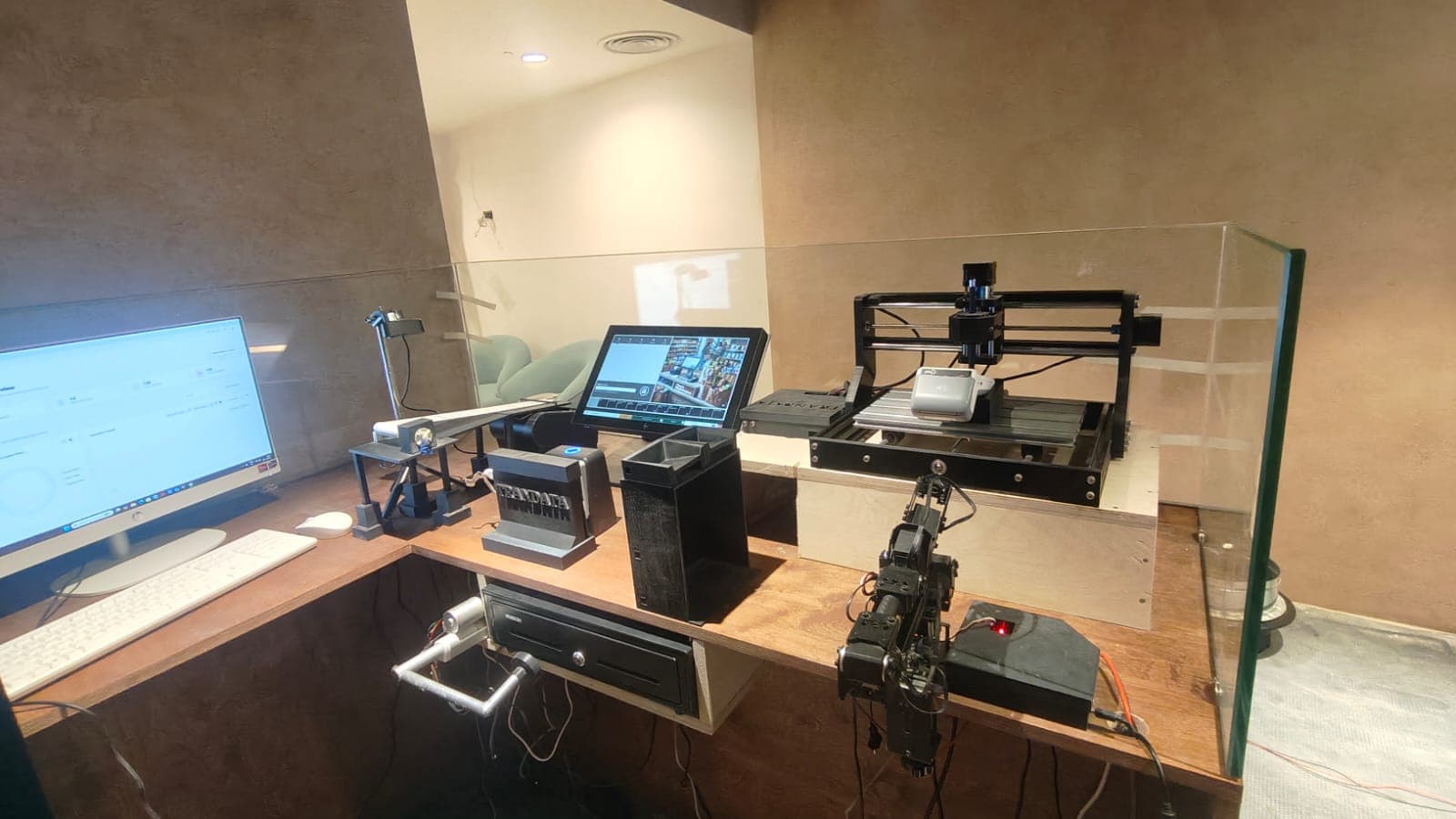
Robotic arms, receipt OCR, barcode simulation and cash-drawer control — coordinated by the same platform that drives your UI tests.
6-DOF SYROBOT arm
A six-degree-of-freedom robotic arm performs human-like actions on payment terminals — swiping magnetic-stripe cards, inserting chip/EMV cards and tapping contactless cards or devices — with accurate, repeatable mechanical interaction on every cycle.
3-axis SCARA robot
A separate 3-DOF SCARA robot with a stylus-based tool mounted on the robot head handles touch devices and customer numeric keypads, simulating secure PIN entry without a human tester repeatedly keying in sensitive data.
AI-driven OCR
A high-resolution camera captures the printed receipt and AI-driven OCR validates items purchased, transaction totals and taxes, timestamp and merchant details, and the receipt format itself — then compares it against the expected values from the test script.
No physical merchandise
A dedicated digital screen presents barcodes and QR codes representing real retail items, so POS scanners read on-screen codes exactly as they would physical products — validating scanning accuracy and item recognition with no stock room required.
Unified platform architecture
The command centre lives in the cloud. Execution lives on your machines. You keep control of where application data and hardware control actually happen.
The command centre
Define test workflows, manage roles and permissions, configure executions and monitor global analytics across every project.
The local agent
Installed directly on your target computers or VMs, where the actual hardware and software execution happens — inside your network.
State and history
Centralised storage for state persistence, dynamic test-data injection and historical performance tracking.
Evidence and insight
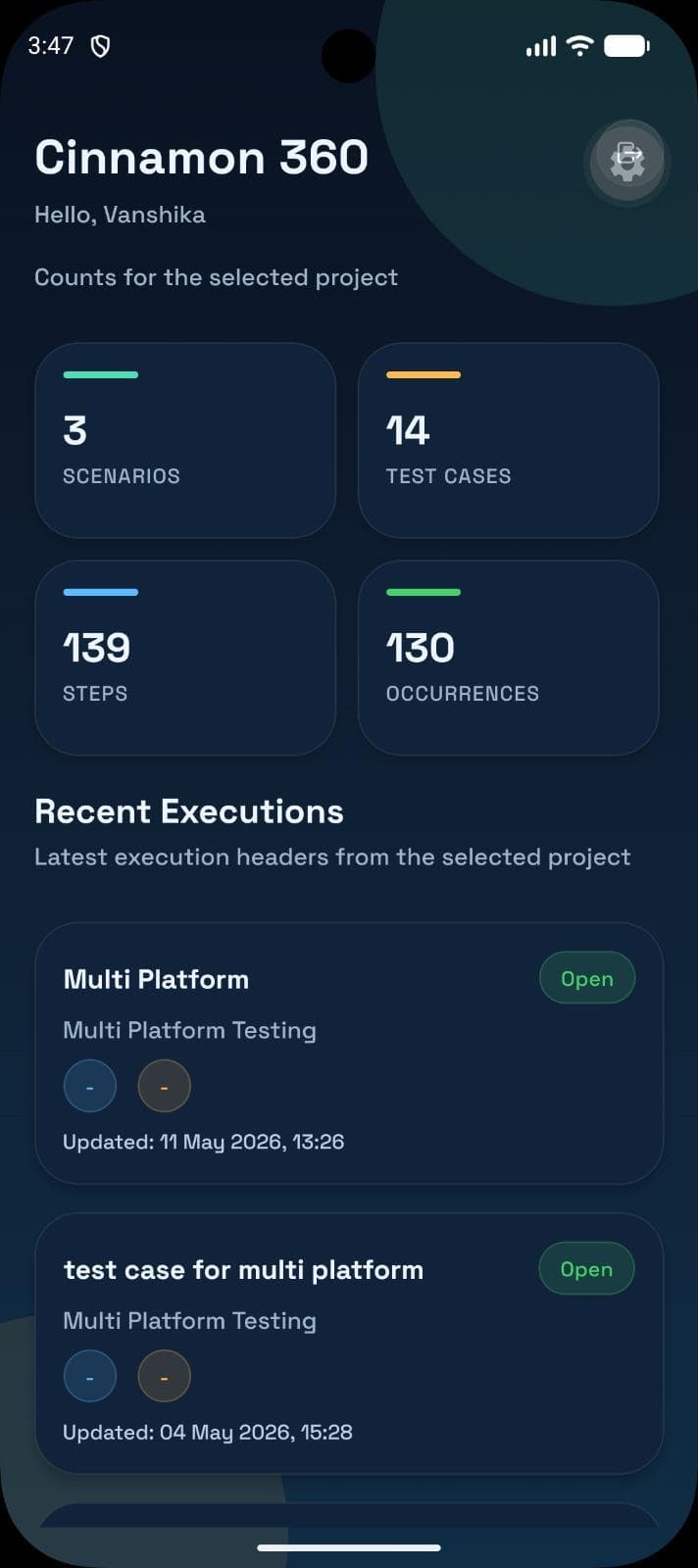
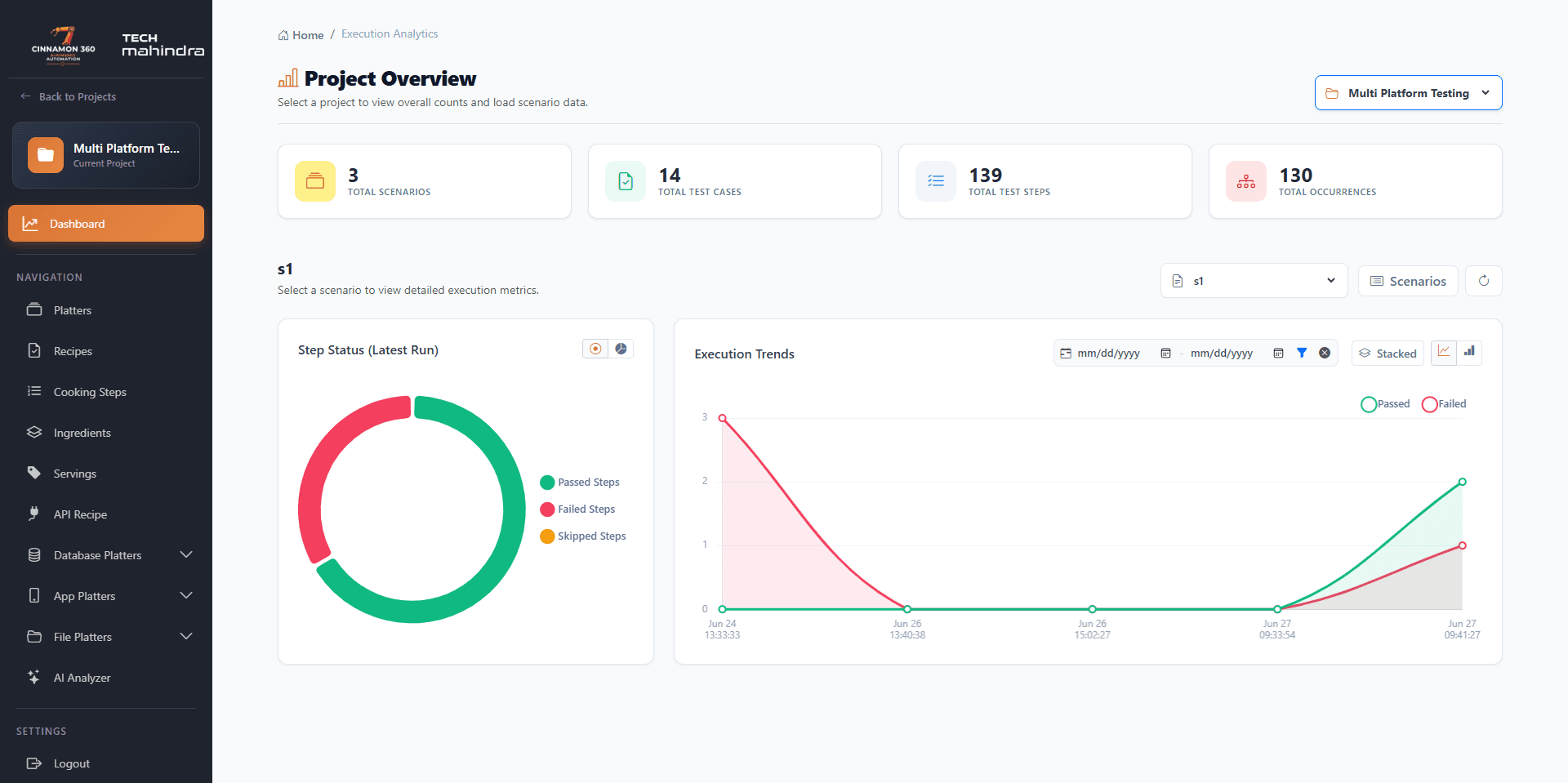
Real-time dashboards, downloadable execution reports and a view-only mobile app for monitoring metrics on the go.
The results, with the context
Every run produces dashboards, step-level results, screenshots and a downloadable PDF report. Add on-the-go monitoring and live camera streams when your workflow needs them.
Proven in production
“Cinnamon360 has transformed how we approach testing. The AI-powered automation saved us countless hours.”
“Cinnamon360 changed the way we handle testing. The AI automation takes care of repetitive work and has saved us countless hours.”
“By adopting Cinnamon360, we achieved a step-change in testing efficiency. The intelligent automation allowed our teams to focus on what truly matters.”
Built by Trandata Technology Solution in collaboration with Keenlad Consulting.
A few things to know
Something specific in mind? Ask us directly — we answer within one business day.
Talk to the teamDesktop and legacy thick-client UI, web browsers, Android and iOS apps, REST APIs, seven database engine families, remote file and log validation, and performance testing — plus physical POS hardware and robotics through the IoT control application.
Tap any trial button and it opens WhatsApp with a message ready to send — tell us about your applications and testing goals. We provision your workspace, help you install the execution agent on a target machine, and give you 15 days of full platform access. No card is required to start.
The Basic plan starts at $49 USD per month. The Team plan is $199 per month for growing QA teams. Physical hardware automation, robotics and enterprise deployments are scoped separately — talk to us and we will size it against your actual environment.
Teams typically consolidate HP ALM, UiPath/SikuliX/UFT, Selenium, Postman, custom database validation scripts, Appium and JMeter into one platform — the source of the 40–60% reduction in tool sprawl and licensing.
Yes. Executions can be triggered manually, on a schedule, by cron, or from your CI/CD pipeline, and every run produces a downloadable PDF report with results and status.
No. Tests are composed from reusable ingredients — clicks, inputs, API calls, queries and assertions — and the Chrome extension can record actions and convert them directly into test steps.
Today: one-click business and BDD summaries, chat-driven execution and result analysis, and image, screenshot and video analysis in project context, using OpenAI, Gemini or Copilot. In beta: full scenario generation from requirements, coverage-gap suggestions and manual-to-automated test conversion.
No. Software automation stands alone. The POS and robotics layer is for teams validating retail and payment ecosystems where the terminal, printer, scanner and cash drawer are part of the journey.
Both are optional. The view-only mobile app — Cinnamon360 Mobile, available on Google Play — gives on-the-go execution visibility, and authenticated multi-camera WebRTC streaming lets you watch the physical setup during a run.
Let’s automate what matters
Bring your applications, your devices and your hardest testing problem. We will show you where Cinnamon360 fits — and where it does not.
No credit card required · Plans from $49/month · ankit@trandata.co.in